4.8 / 5 stars on Trustpilot
Get started

CR80 card layout reference

CR80 ID Card Dimensions for Layout & Artwork

A standard ID card is CR80 size: 3.375 x 2.125 inches (about 85.6 x 54 mm, the ISO ID-1 size), 30 mil (0.76 mm) thick, with corners rounded to about 1/8 inch. At 300 dpi, card artwork is 1013 x 638 pixels, or 1050 x 675 pixels with 1/16 inch of bleed on each side. Pick your layout to download a free template.

  • 3.375 x 2.125 inCR80 card size
  • about 85.6 x 54 mmthe ISO ID-1 size
  • 1013 x 638 pxat 300 dpi
  • 1050 x 675 pxwith 1/16 in bleed

Last reviewed November 9, 2026 by the InstantCard production team · Spec v1.0.0 Comparing card sizes? See our ID card size comparison.

Download a free CR80 ID card template

Choose your card. Each template has the bleed, card edge, safe line and keep-out zones as guide layers.

Orientation
Slot punch
Exposed contact chip

Contactless RFID cards have no visible chip: choose None.

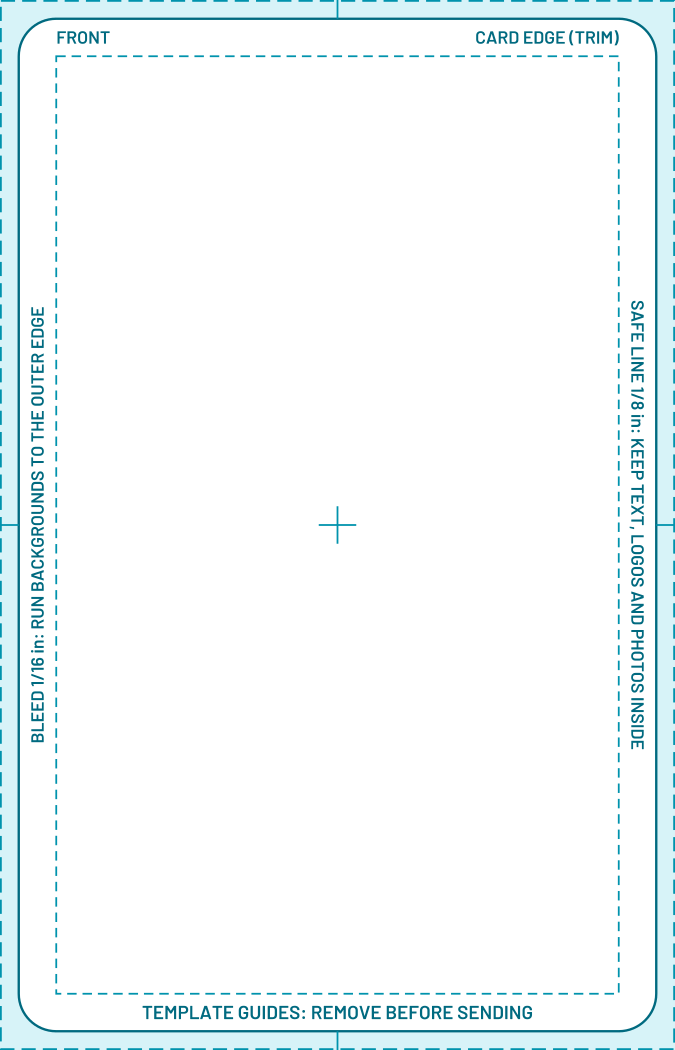
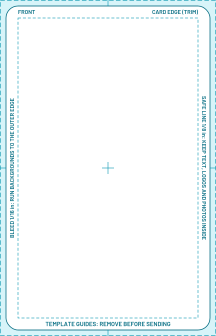
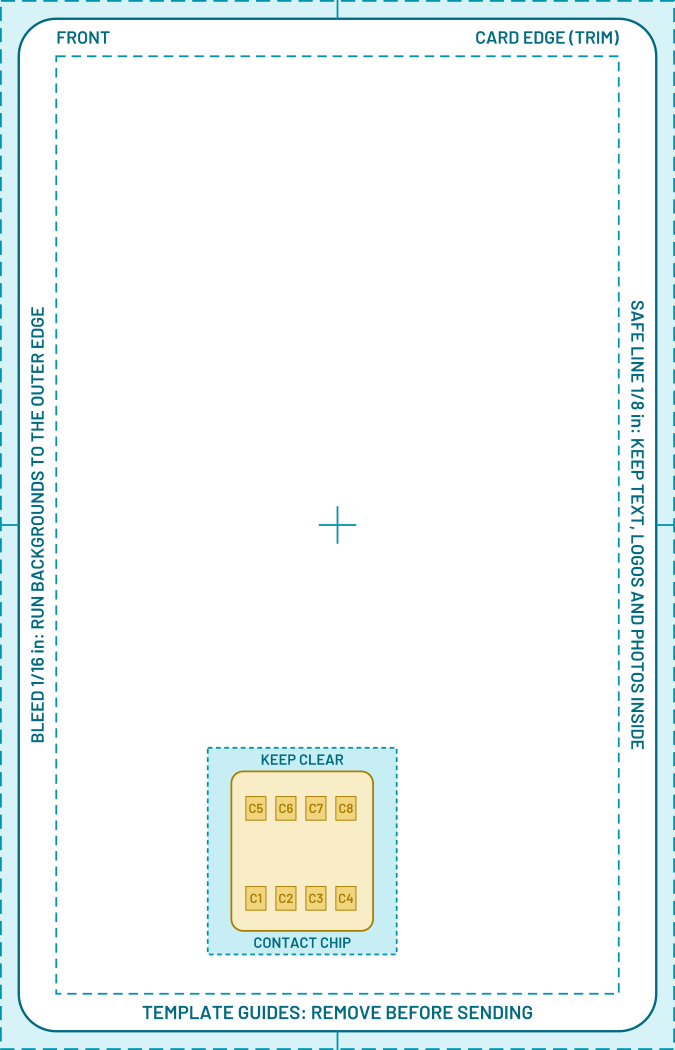
CR80 card template, front: portrait, no slot punch, no exposed chip Front of a CR80 card (portrait, no slot punch, no exposed chip), portrait. Card (trim): 53.975 x 85.725 mm (2.125 x 3.375 in), corner radius 3.175 mm (1/8 in). With bleed: 57.15 x 88.9 mm (2.25 x 3.5 in; 675 x 1050 px at 300 dpi); bleed 1.5875 mm (1/16 in) on every side. Safe line: 3.175 mm (1/8 in) inside the card edge. Units: mm from the card's top-left corner. Template guides: remove before sending. CR80 card template, front: portrait, no slot punch, no exposed chipInstantCard2026-11-09https://instantcard.net/card-layout-and-artwork/CC BY 4.0: free to use and share with credit to InstantCard (https://instantcard.net/card-layout-and-artwork/). TEMPLATE GUIDES: REMOVE BEFORE SENDING FRONT CARD EDGE (TRIM) BLEED 1/16 in: RUN BACKGROUNDS TO THE OUTER EDGE SAFE LINE 1/8 in: KEEP TEXT, LOGOS AND PHOTOS INSIDE
Portrait, no slot punch, no exposed chip Card 2.125 x 3.375 in; 675 x 1050 px at 300 dpi with bleed. Bleed 1/16 in on each side, safe line 1/8 in inside the card edge. Card stock: Every card stock we print.
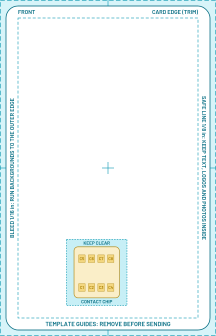
Template preview: portrait, no slot punch, exposed contact chip
Portrait, no slot punch, exposed contact chip Card 2.125 x 3.375 in; 675 x 1050 px at 300 dpi with bleed. Bleed 1/16 in on each side, safe line 1/8 in inside the card edge. Keep 2 mm clear around the chip, near the bottom. Card stock: Our exposed contact chip card (Atmel CryptoMemory).
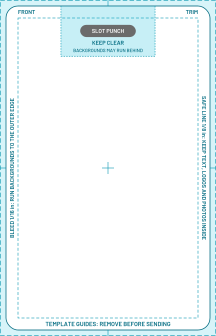
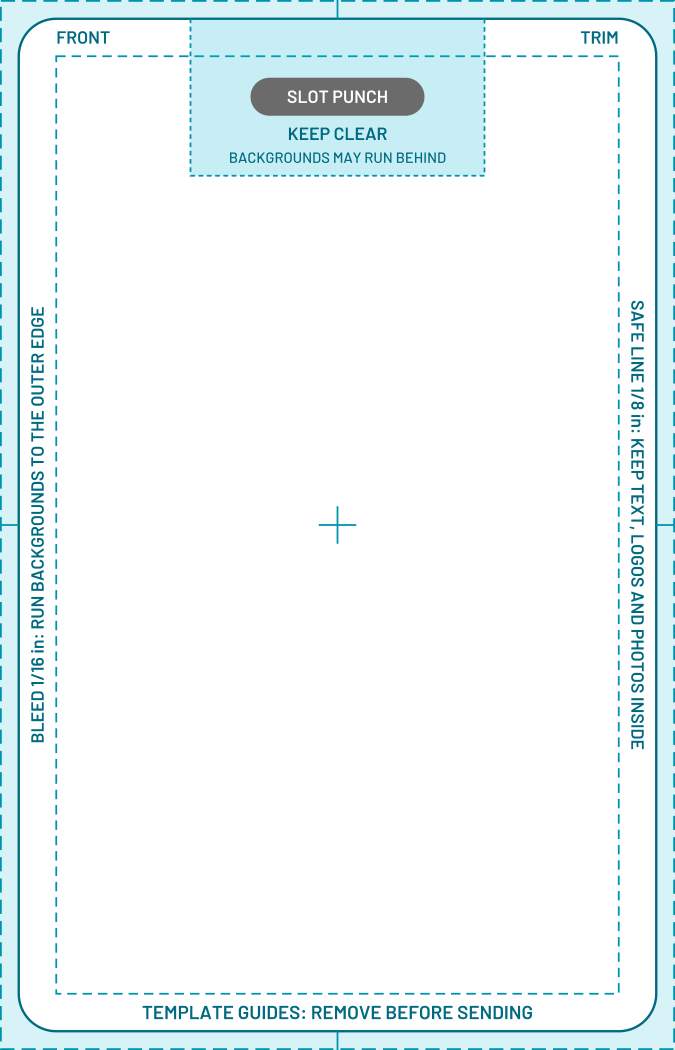
Template preview: portrait, slot punch, no exposed chip
Portrait, slot punch, no exposed chip Card 2.125 x 3.375 in; 675 x 1050 px at 300 dpi with bleed. Bleed 1/16 in on each side, safe line 1/8 in inside the card edge. Keep a 0.98 x 0.53 in zone clear at the top center for the slot punch. Card stock: You can order our standard white PVC cards with the slot already punched, on the short or long edge, and some of our chip cards too. Ask us about the specific card you want.
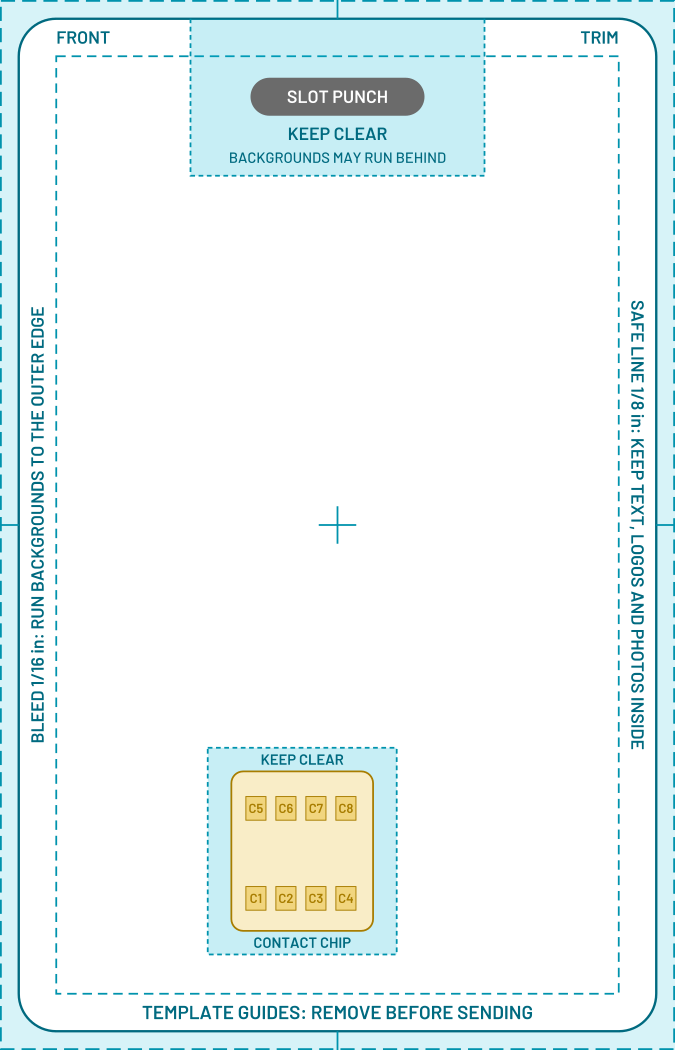
Template preview: portrait, slot punch, exposed contact chip
Portrait, slot punch, exposed contact chip Card 2.125 x 3.375 in; 675 x 1050 px at 300 dpi with bleed. Bleed 1/16 in on each side, safe line 1/8 in inside the card edge. Keep a 0.98 x 0.53 in zone clear at the top center for the slot punch. Keep 2 mm clear around the chip, near the bottom. Card stock: Our exposed contact chip card (Atmel CryptoMemory), with the slot punched.
Template preview: landscape, no slot punch, no exposed chip
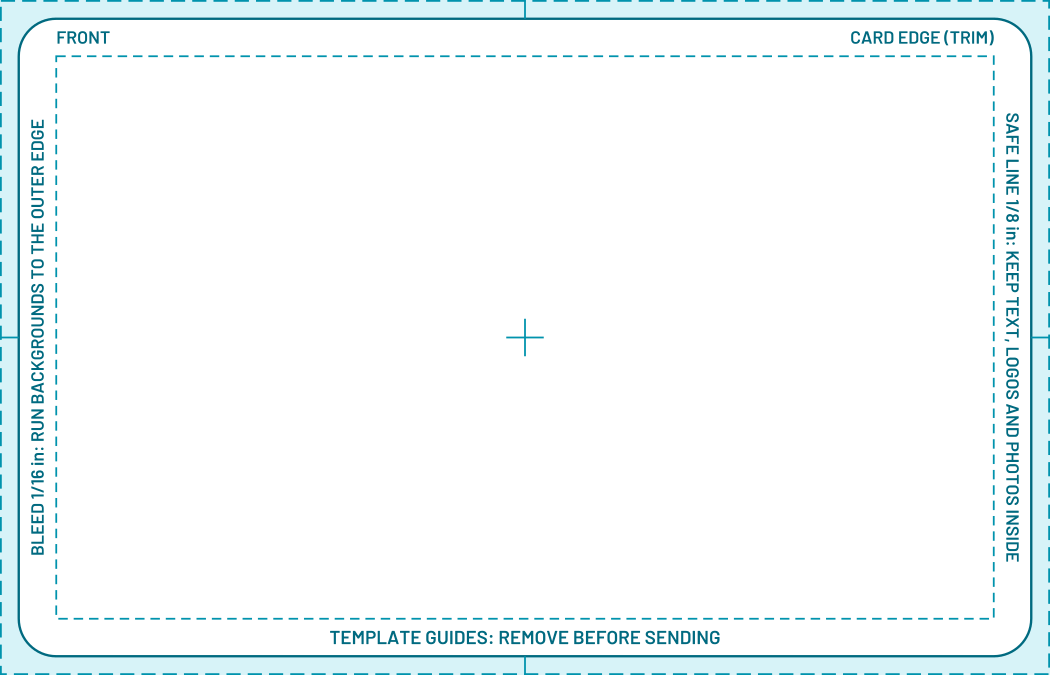
Landscape, no slot punch, no exposed chip Card 3.375 x 2.125 in; 1050 x 675 px at 300 dpi with bleed. Bleed 1/16 in on each side, safe line 1/8 in inside the card edge. Card stock: Every card stock we print.
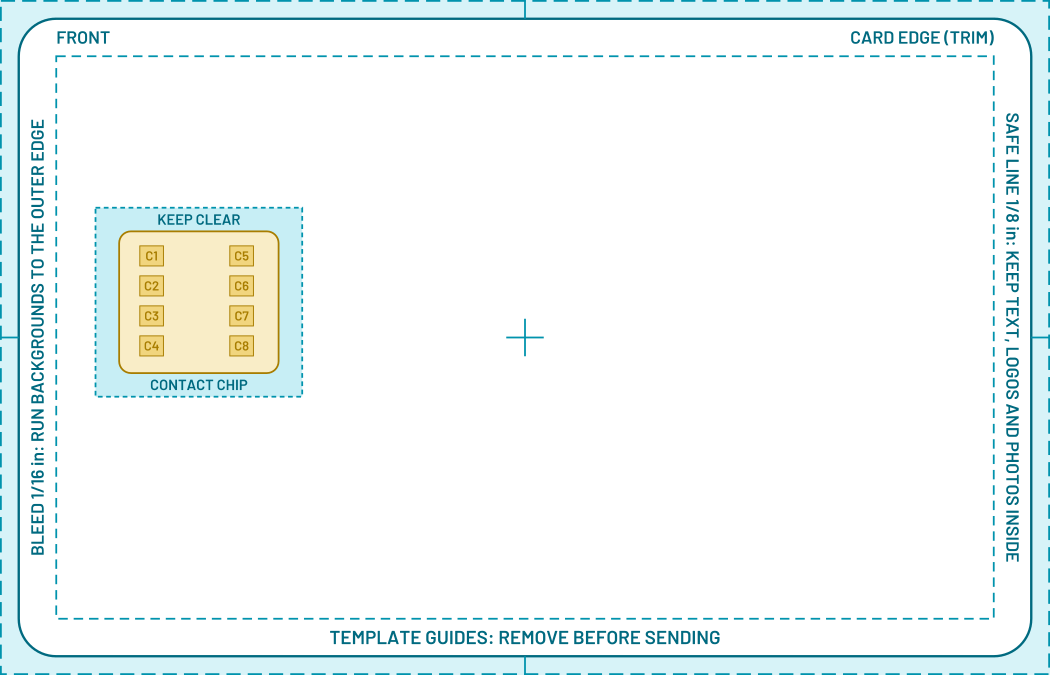
Template preview: landscape, no slot punch, exposed contact chip
Landscape, no slot punch, exposed contact chip Card 3.375 x 2.125 in; 1050 x 675 px at 300 dpi with bleed. Bleed 1/16 in on each side, safe line 1/8 in inside the card edge. Keep 2 mm clear around the chip, on the left. Card stock: Our exposed contact chip card (Atmel CryptoMemory).
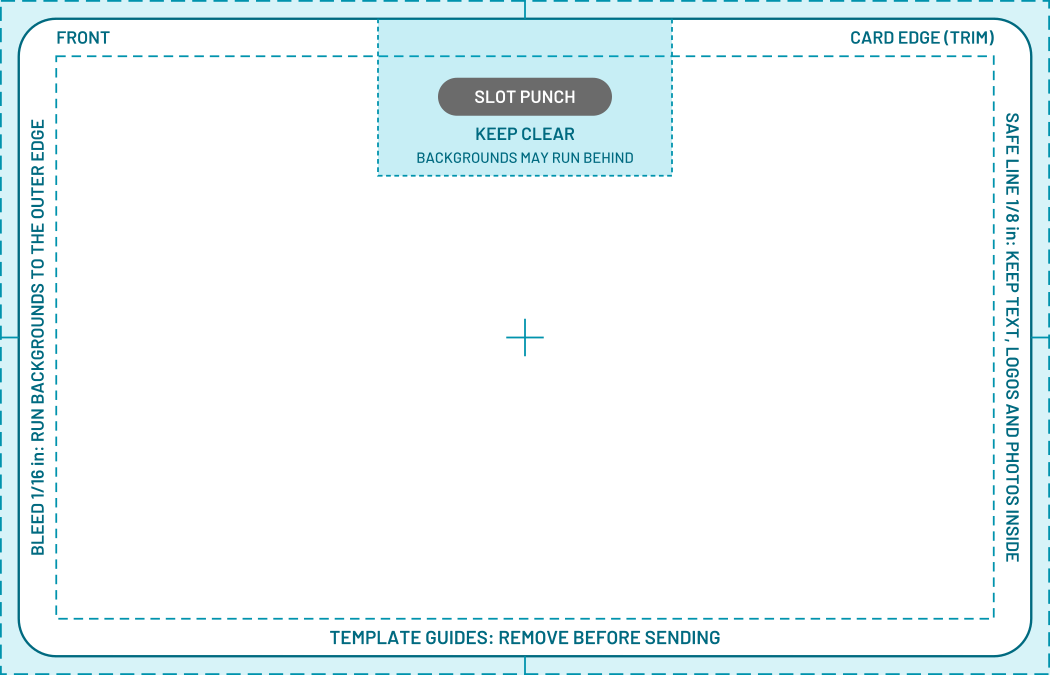
Template preview: landscape, slot punch, no exposed chip
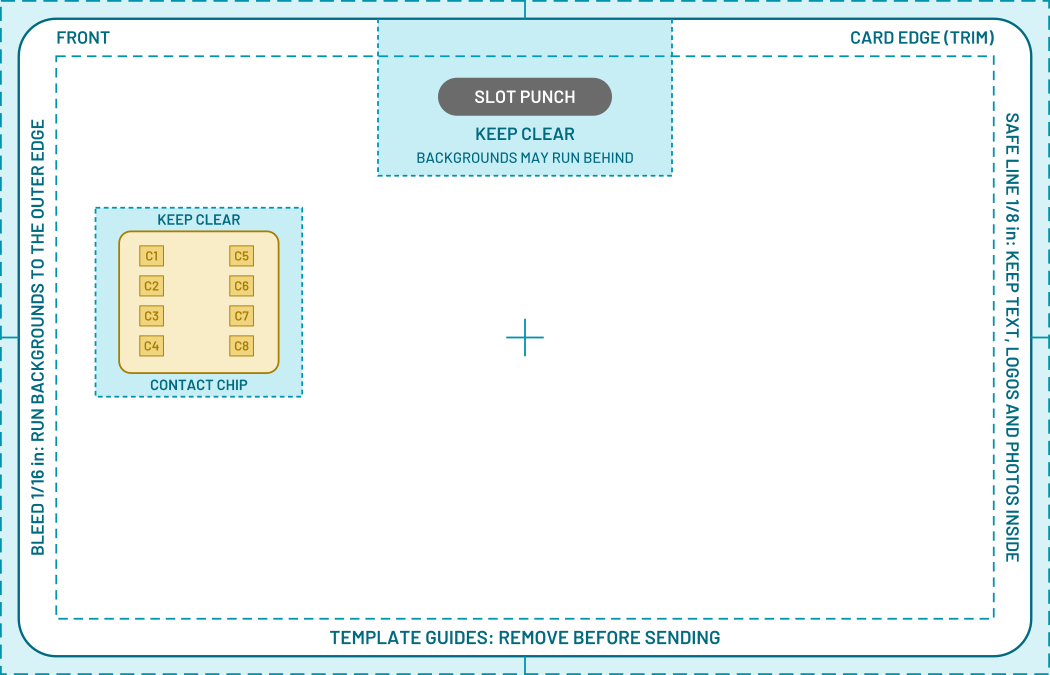
Landscape, slot punch, no exposed chip Card 3.375 x 2.125 in; 1050 x 675 px at 300 dpi with bleed. Bleed 1/16 in on each side, safe line 1/8 in inside the card edge. Keep a 0.98 x 0.53 in zone clear at the top center for the slot punch. Card stock: You can order our standard white PVC cards with the slot already punched, on the short or long edge, and some of our chip cards too. Ask us about the specific card you want.
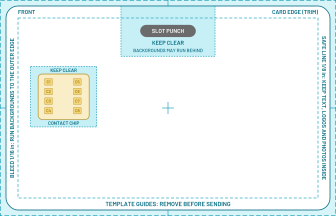
Template preview: landscape, slot punch, exposed contact chip
Landscape, slot punch, exposed contact chip Card 3.375 x 2.125 in; 1050 x 675 px at 300 dpi with bleed. Bleed 1/16 in on each side, safe line 1/8 in inside the card edge. Keep a 0.98 x 0.53 in zone clear at the top center for the slot punch. Keep 2 mm clear around the chip, on the left. Card stock: Our exposed contact chip card (Atmel CryptoMemory), with the slot punched.
All 8 templates and how to use them

Card size

CR80 ID card size in inches, mm, cm and pixels

CR80 is the card industry's name for the standard ID card and ID badge size. ISO/IEC 7810 calls the same size ID-1, and it's also the size of credit and debit cards. Measured landscape, the card is 3.375 inches wide and 2.125 inches high; turned to portrait it's 2.125 inches wide and 3.375 inches high. In centimeters, the trade size is 8.57 x 5.40 cm.

Employee ID badges, school, student, company, staff and membership ID cards are almost all this size, and so are the badge holders and wallets made for them. We print on 30 mil CR80 PVC.

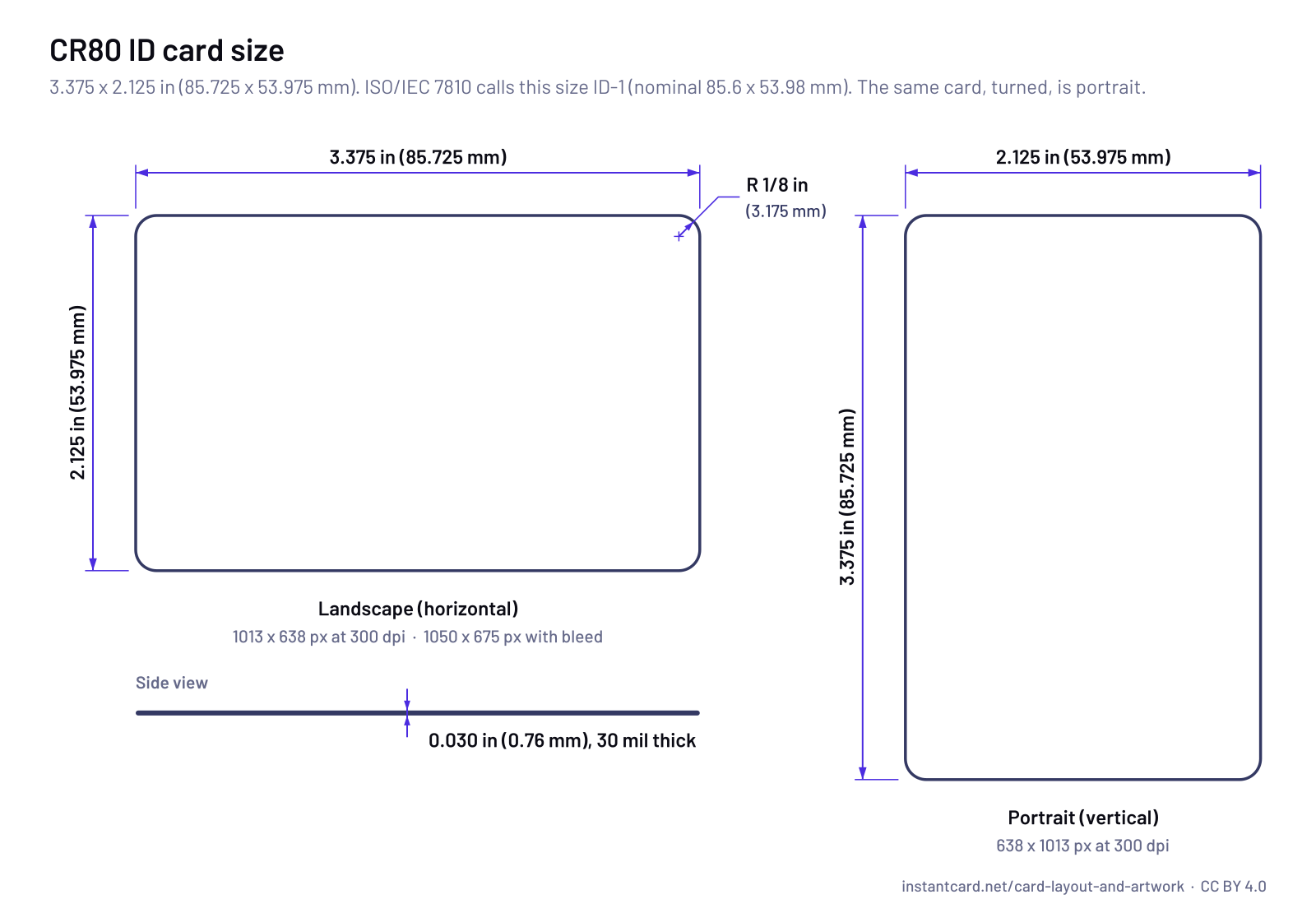
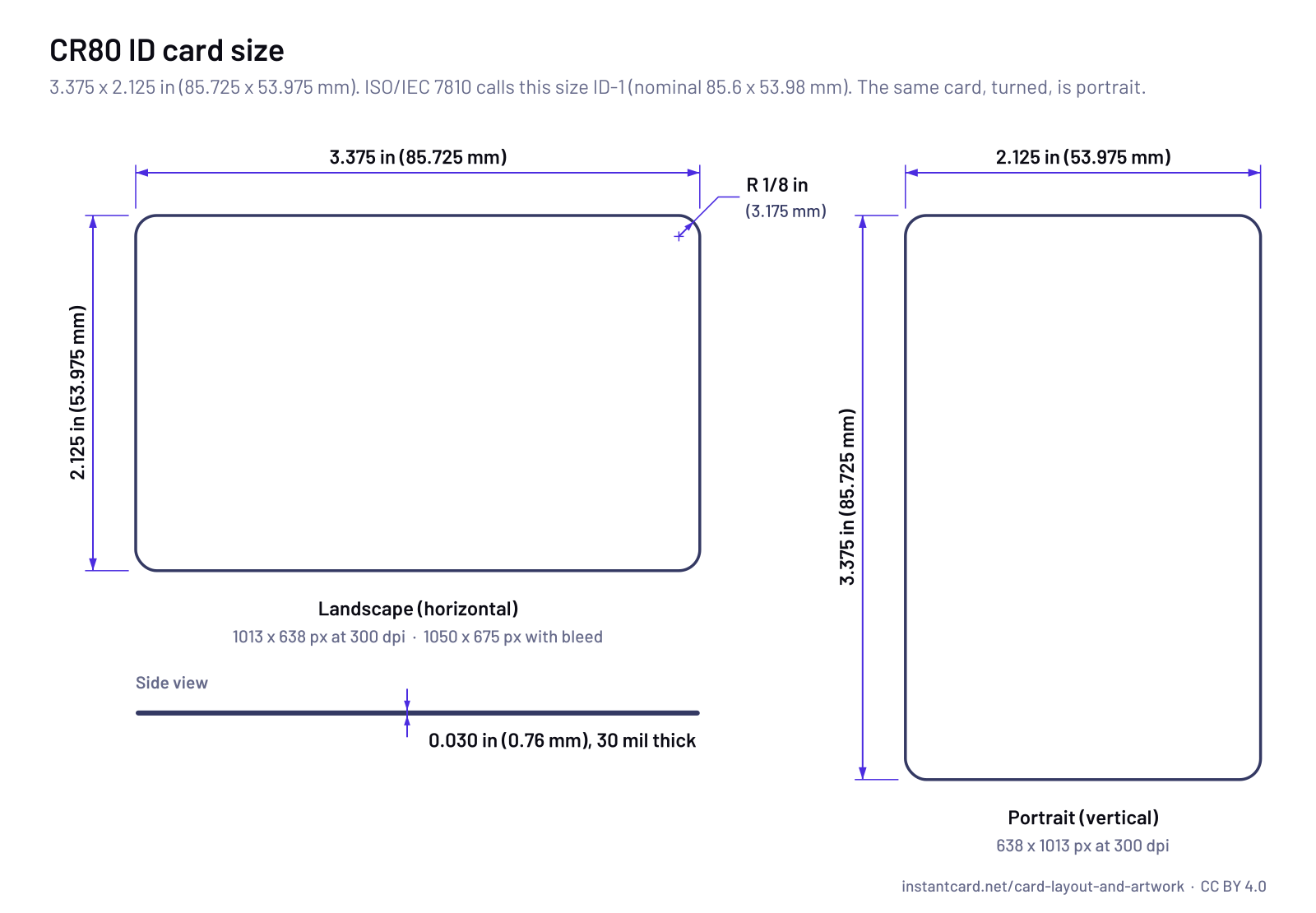
Standard ID card size: CR80 card dimensions, 3.375 x 2.125 in, landscape and portrait
CR80 ID card dimensions. CR80 card, landscape and portrait: 3.375 x 2.125 in (85.725 x 53.975 mm), corner radius 1/8 in, 30 mil thick. 1013 x 638 px at 300 dpi. SVG · PNG Tap the diagram to open it full size.
CR80 card dimensions in inches, millimeters and pixels
Measure InchesMillimetersPixels at 300 dpiPixels at 600 dpi
Card, landscape (width x height) 3.375 x 2.125 (3 3/8 x 2 1/8)85.725 x 53.9751013 x 638 (1012.5 x 637.5)2025 x 1275
Card, portrait (width x height) 2.125 x 3.37553.975 x 85.725638 x 1013 (637.5 x 1012.5)1275 x 2025
ISO/IEC 7810 ID-1 nominal size 3.370 x 2.12585.6 x 53.98
With bleed, landscape 3.5 x 2.2588.9 x 57.151050 x 6752100 x 1350
With bleed, portrait 2.25 x 3.557.15 x 88.9675 x 10501350 x 2100
Bleed, each side 1/16 (0.0625)1.587519 (18.75)38
Safe margin, recommended 1/8 (0.125)3.17538 (37.5)75
Safe margin, our studio's minimum 0.0671.692040
Safe area, landscape 3.125 x 1.87579.375 x 47.625937 x 562 (937.5 x 562.5)1875 x 1125
Corner radius about 1/83.175 (ISO 2.88 to 3.48)38 (37.5)75
Thickness 0.030 (30 mil)0.76 (ISO 0.68 to 0.84)
Aspect ratio 1.588 : 11.586 : 1 (ISO)

Pixel sizes for artwork are rounded up so the artwork covers the card; the safe area is rounded inward. Exact values are in brackets, so rounded parts don't always add up. ISO/IEC 7810 gives the width of a new ID-1 card as 85.47 to 85.72 mm (3.365 to 3.375 in).

Why you'll see both 85.6 mm and 3.375 in

ISO defines the card in millimeters (85.6 x 53.98 mm). Card printers and suppliers work in inches (3 3/8 x 2 1/8 in = 85.725 x 53.975 mm). The 0.125 mm difference sits at the top of ISO's width tolerance for a new card (85.47 to 85.72 mm, or 3.365 to 3.375 in) and is about 1.5 px at 300 dpi, so either works for artwork. Our templates use 3.375 x 2.125 in.

Thickness

A standard card is 30 mil: 0.030 in (0.76 mm). ISO/IEC 7810 allows 0.68 to 0.84 mm. The corners are rounded to about 1/8 in (3.175 mm; ISO allows 2.88 to 3.48 mm).

Resolution

ID card size in pixels at 300 and 600 dpi

At 300 dpi a CR80 card is 1013 x 638 pixels landscape, or 638 x 1013 portrait. With 1/16 in of bleed on each side it's 1050 x 675 (675 x 1050 portrait). At 600 dpi: 2025 x 1275, or 2100 x 1350 with bleed.

Rounding

3.375 in at 300 dpi is 1012.5 x 637.5 px, so no whole number is exact. Round up to 1013 x 638 so your artwork covers the card. Our design studio works at 1012 x 638, within a pixel of that, so either size fits the card.

Photos and logos

Images need 300 pixels for every inch they print. A logo printed one inch wide needs at least 300 px across, and a full-card background needs 1050 x 675 px.

CR80 artwork size in pixels at 300 and 600 dpi
Artwork 300 dpi600 dpi
Card, landscape (width x height) 1013 x 638 (exact 1012.5 x 637.5)2025 x 1275
Card, portrait (width x height) 638 x 1013 (exact 637.5 x 1012.5)1275 x 2025
With bleed, landscape 1050 x 6752100 x 1350
With bleed, portrait 675 x 10501350 x 2100
Bleed, each side 19 (exact 18.75)38
Safe margin, recommended 38 (exact 37.5)75
Safe margin, our studio's minimum 2040
Safe area, landscape 937 x 562 (exact 937.5 x 562.5)1875 x 1125

Bleed and safe zone

Bleed, trim and safe zone

Bleed is extra background past the card edge, so color runs right to the edge with no white sliver. Our card printers print slightly past the edge of the card, so add 1/16 in (1.6 mm) on every side: a landscape design becomes 3.5 x 2.25 in (1050 x 675 px at 300 dpi), and a portrait one 2.25 x 3.5 in (675 x 1050 px).

The card edge (the trim) is the 3.375 x 2.125 in card itself. Run backgrounds past it to the outer edge of the bleed, and keep everything that matters inside the safe line.

Safe zone

Keep text, logos, photos and codes at least 1/8 in (3.2 mm, 38 px at 300 dpi) inside the card edge. That's our recommended safe margin, and it matches the 1/8 in corner radius, so nothing sits in a rounded corner.

Our card studio's minimum is 20 px (1.7 mm) from the edge, and its safe line shows where that is. The recommended 1/8 in gives text and logos more room to breathe.

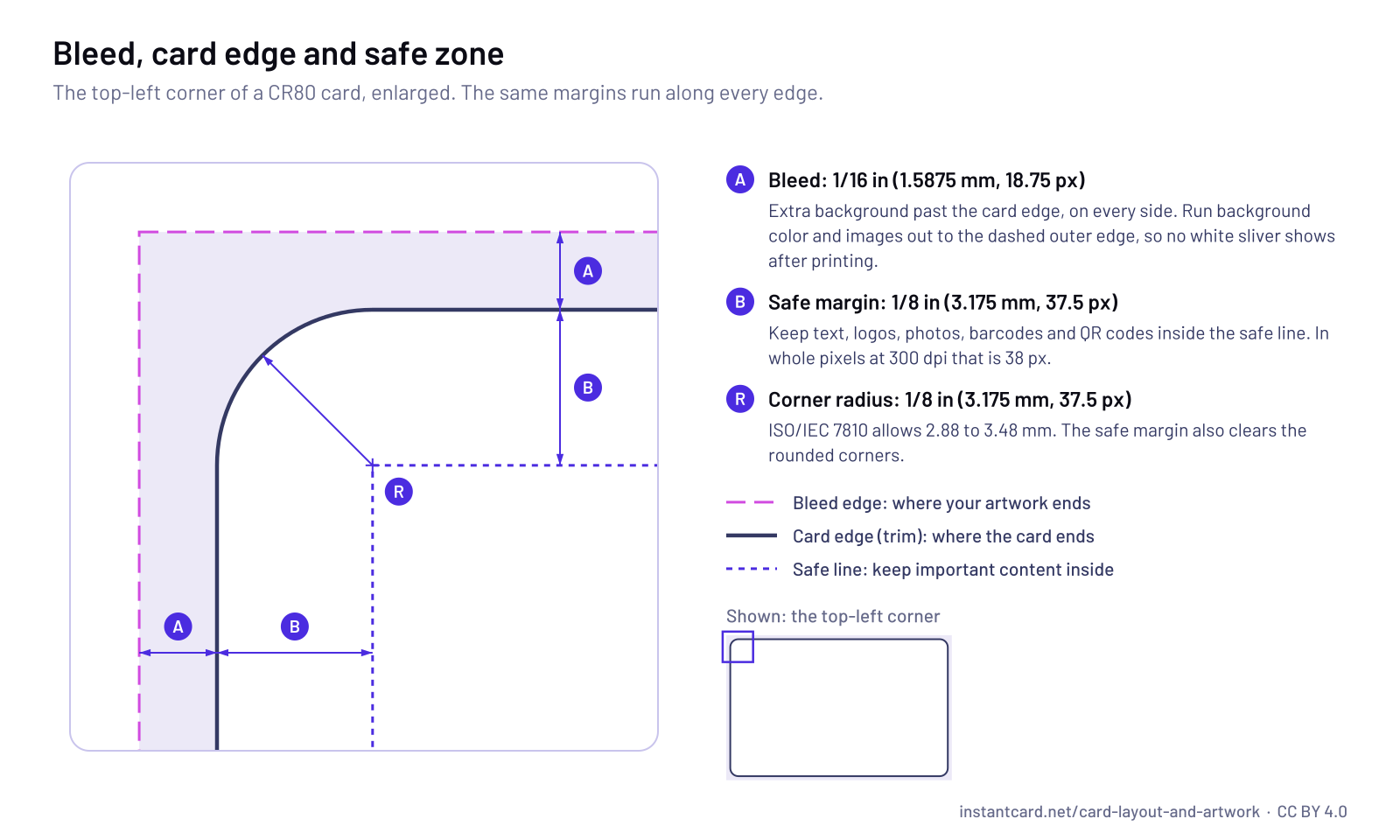
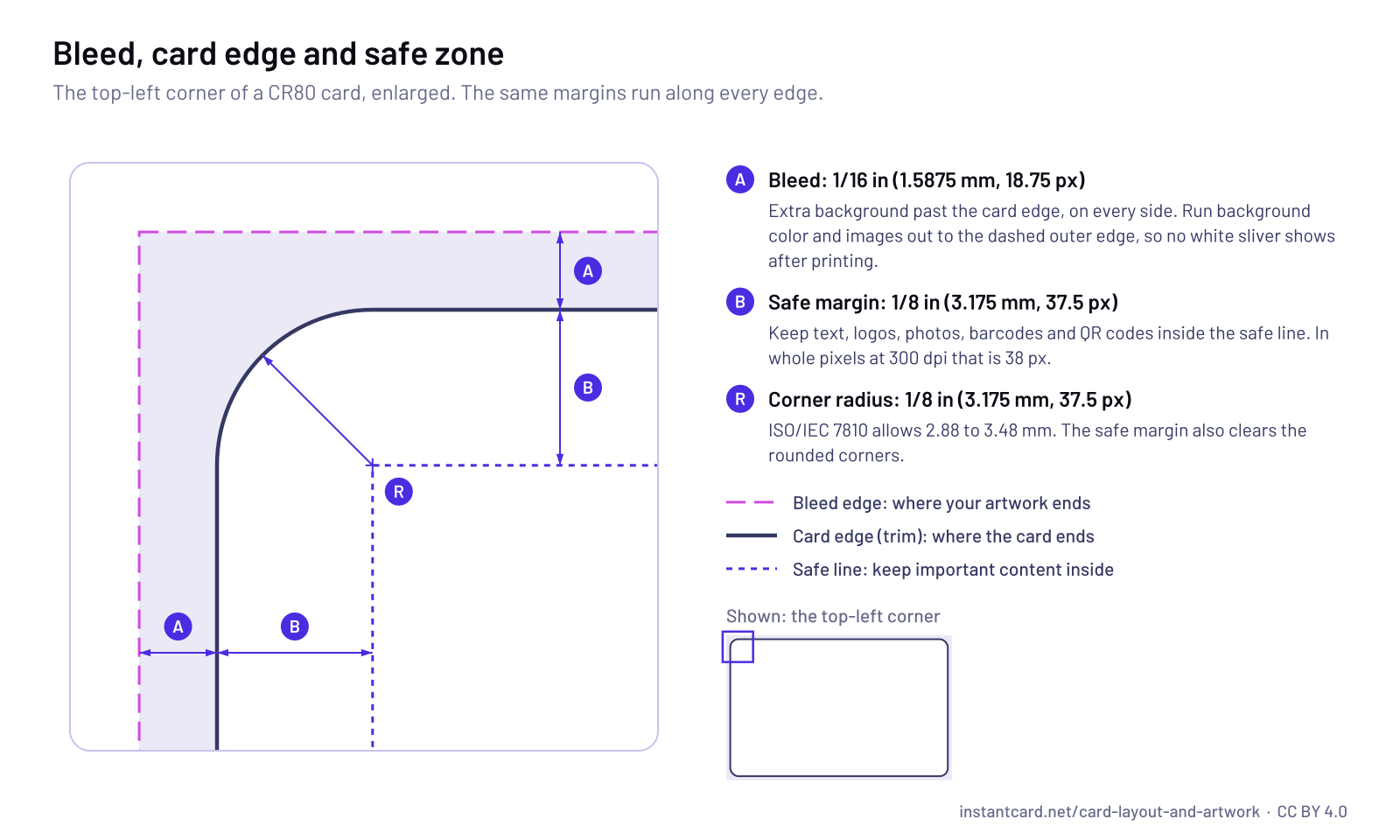
ID card bleed and safe zone: 1/16 in bleed and a 1/8 in safe margin
CR80 card bleed, trim and safe zone. A card corner, enlarged: bleed 1/16 in (1.6 mm) past the card edge, safe line 1/8 in (3.2 mm, 38 px) inside it. SVG · PNG Tap the diagram to open it full size.

Orientation

Portrait or landscape

Same card, turned. Portrait suits a photo above the name and hangs well on a lanyard; landscape suits wide logos and wallet use. The slot punch follows the orientation (the top short edge on portrait, the top long edge on landscape), and so does the chip.

Template preview: portrait, no slot punch, no exposed chip
Portrait: 2.125 x 3.375 in, 638 x 1013 px
Template preview: landscape, no slot punch, no exposed chip
Landscape: 3.375 x 2.125 in, 1013 x 638 px

Slot punch

Slot punch position and keep-out zone

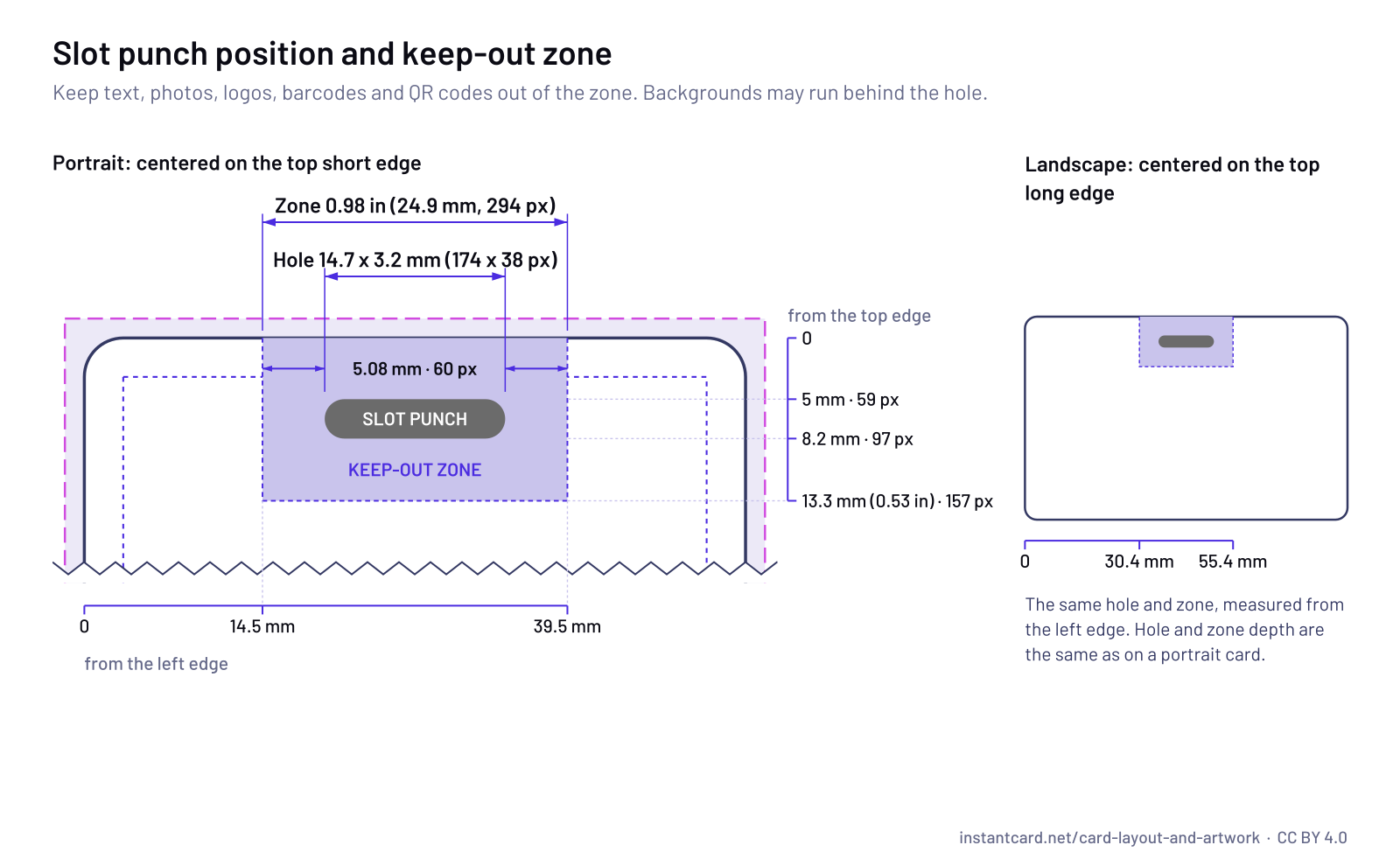
The slot is centered on the top edge, about 5 mm down. Keep text and logos out of a 0.98 x 0.53 in (24.9 x 13.3 mm) zone centered on that edge: that's 294 x 157 px at 300 dpi, 157 px deep. Backgrounds can run behind the hole.

A slot punch is the hole for a lanyard clip or badge reel. On a portrait card it's centered on the top short edge; on a landscape card it's centered on the top long edge.

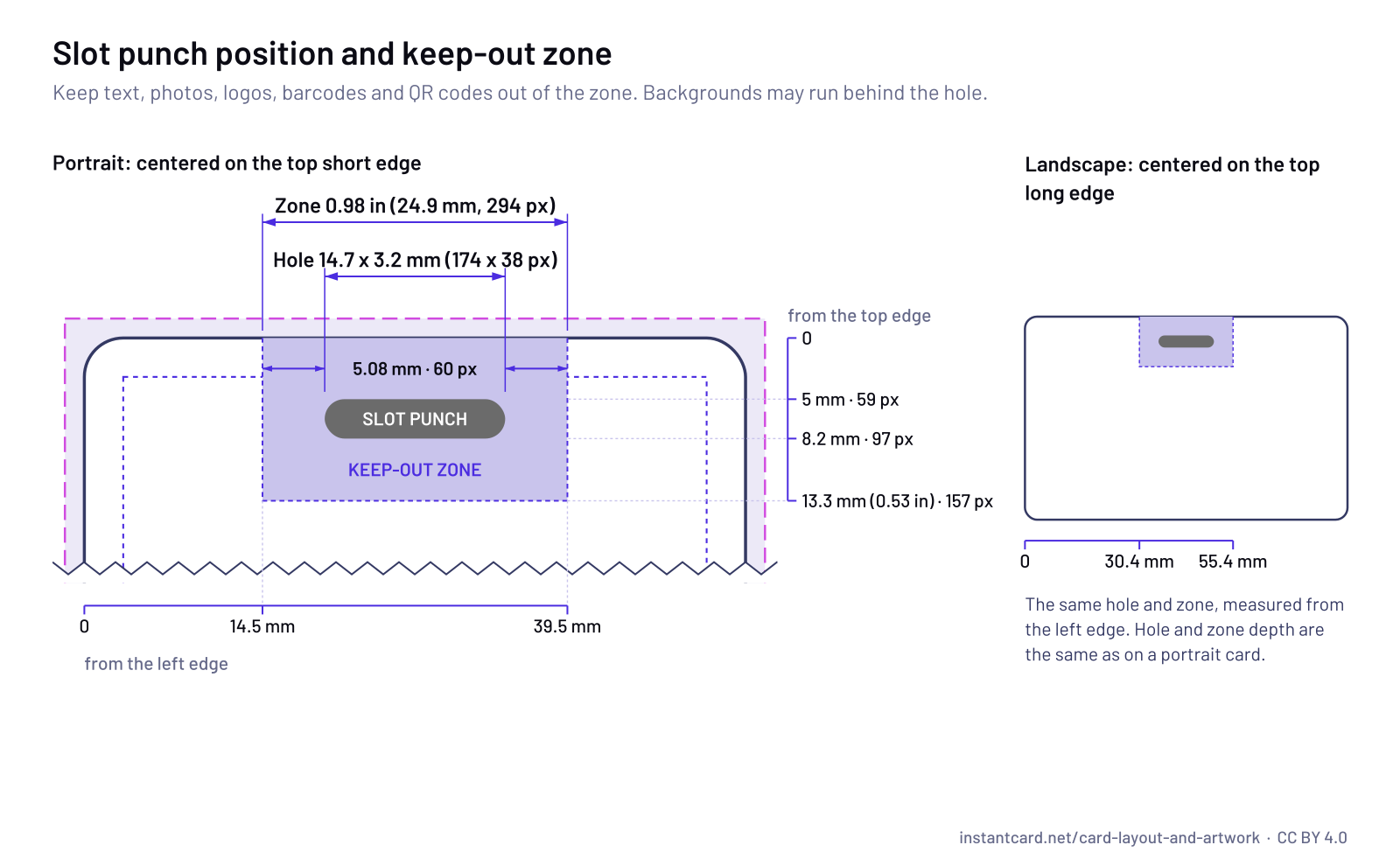
ID card slot punch position and its 0.98 x 0.53 in keep-out zone
ID card slot punch dimensions and keep-out zone. Slot punch: a 14.7 x 3.2 mm hole, 5 mm from the top edge, centered; keep a 0.98 x 0.53 in (294 x 157 px) zone clear. SVG · PNG Tap the diagram to open it full size.
Slot punch hole and keep-out zone, measured from the punched (top) edge of the card
Measure Portrait (short edge)Landscape (long edge)
Hole (our studio's drawing; real punches vary) 14.7 x 3.2 mm (0.58 x 0.13 in; 174 x 38 px), pill-shaped, centeredSame
Hole top, from the edge 5 mm (0.2 in; 59 px)Same
Hole bottom, from the edge 8.2 mm (0.32 in; 97 px)Same
Keep-out zone (no text, photos, logos, barcodes or QR codes) 24.9 x 13.3 mm (0.98 x 0.53 in; 294 x 157 px), from the edge down, centeredSame
Keep-out zone, from the left edge 14.5 to 39.5 mm (0.57 to 1.56 in; 171 to 466 px)30.4 to 55.4 mm (1.19 to 2.18 in; 359 to 654 px)
Backgrounds May run behind the holeSame
  • The keep-out zone is the hole plus 5.1 mm (60 px) on every side, clipped to the card. Its edges are rounded outward, so a range can run slightly wider than the zone's size.
  • Hand punches and pre-punched cards vary. Common sizes: the 1/2 x 1/8 in standard slot, 9/16 x 1/8 in slot and 3 x 16 mm pre-punched stock.
  • Contactless cards hide an antenna inside, so punch only cards made for it. The US government's PIV standard (FIPS 201-3) warns that a punched opening must not damage or interfere with the antenna.

Which cards come punched

You can order our standard white PVC cards with the slot already punched, on the short or long edge, and some of our chip cards too. Ask us about the specific card you want.

A slot punch adds $0.60 a card on our Small Business plan (see pricing for every plan) and is included on pay as you go. Slot punch and chip card prices.

Contact chip

Contact chip position (ISO/IEC 7816-2)

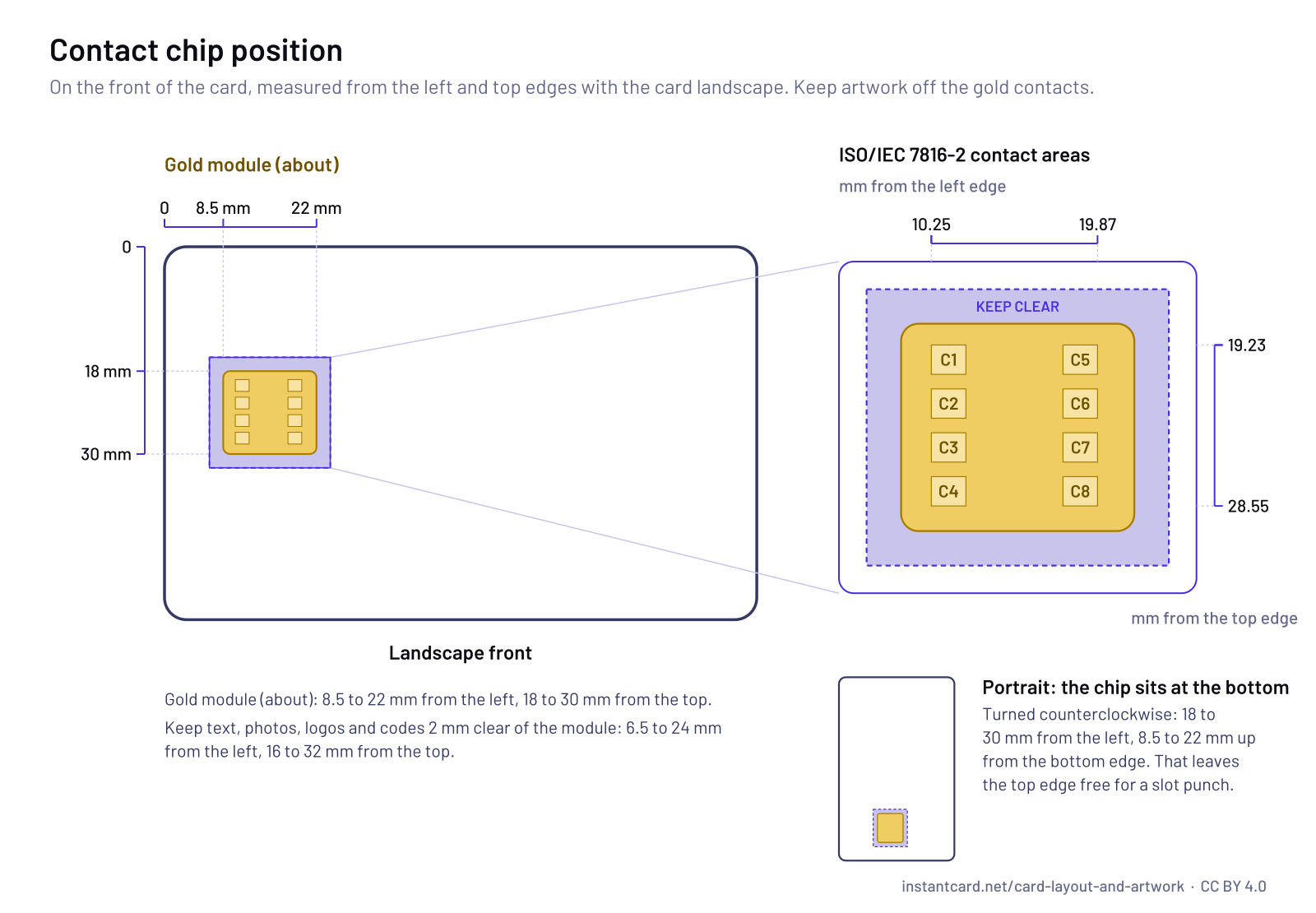
On a landscape card the gold module sits about 8.5 to 22 mm from the left edge and 18 to 30 mm from the top; ISO/IEC 7816-2 places the contacts within 10.25 to 19.87 mm from the left and 19.23 to 28.55 mm from the top. On a portrait card the chip sits near the bottom, about 8.5 to 22 mm up from the bottom edge.

An exposed contact chip is the gold pad on cards that go into a reader slot. ISO/IEC 7816-2 fixes where the contacts sit: on the front of the card, measured from the left and top edges with the card landscape. Contactless (RFID) cards have no visible chip, so they use the plain templates.

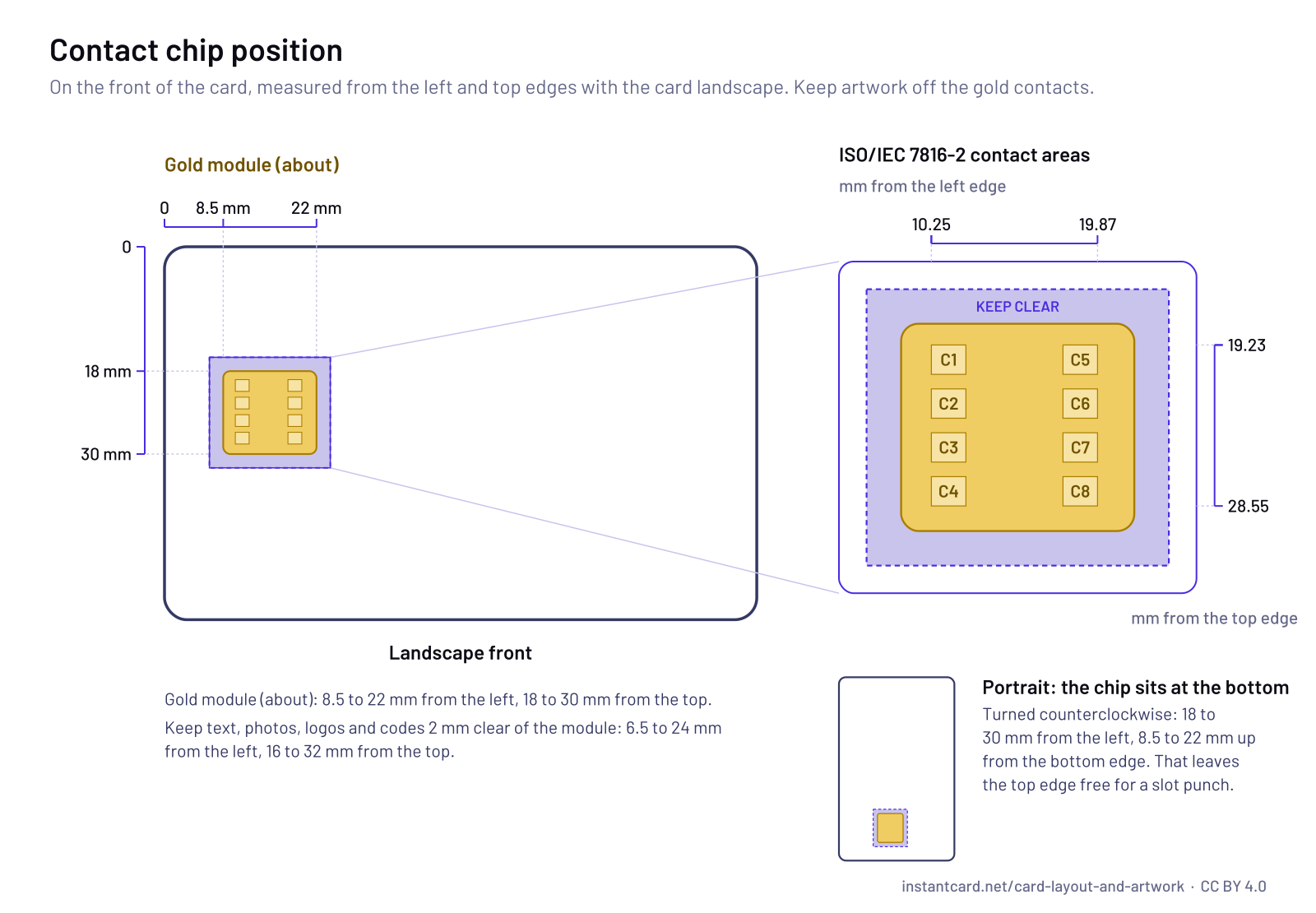
Smart card chip position on a CR80 card, with the ISO contact zones
Smart card contact chip position. Contact chip, landscape: the gold module at 8.5 to 22 mm from the left and 18 to 30 mm from the top; ISO contacts C1 to C8 within 10.25 to 19.87 by 19.23 to 28.55 mm. SVG · PNG Tap the diagram to open it full size.
Contact chip position on the front of the card
Measure LandscapePortrait (chip at the bottom)
Gold module (a typical 8-contact module) 8.5 to 22 mm from the left; 18 to 30 mm from the top18 to 30 mm from the left; 8.5 to 22 mm up from the bottom
Gold module at 300 dpi x 100 to 260, y 212 to 355 pxx 212 to 355, y 752 to 913 px
ISO/IEC 7816-2 contact area (C1 to C8) 10.25 to 19.87 mm from the left; 19.23 to 28.55 mm from the top19.23 to 28.55 mm from the left; 10.25 to 19.87 mm up from the bottom
Keep-out zone (module + 2 mm) 6.5 to 24 mm from the left; 16 to 32 mm from the top (17.5 x 16 mm)16 to 32 mm from the left; 6.5 to 24 mm up from the bottom (16 x 17.5 mm)
Keep-out zone at 300 dpi x 76 to 284, y 188 to 378 pxx 188 to 378, y 729 to 936 px

Measured on the front of the card. Portrait values are measured up from the bottom edge, so they hold whatever the exact card length.

Turned to portrait, the chip sits near the bottom. That leaves the top edge free for a slot punch, and it matches the US government's PIV card layout (FIPS 201-3, Figure 4-1).

FIPS 201-3 also says printed items shall not cover the contact surface. Keep text, photos, logos and codes 2 mm clear of the module.

We print photo IDs on Atmel CryptoMemory exposed chip cards: $4.50 more a card on prepaid, or $16.50 a card all in on pay as you go. An exposed chip can't be combined with a holographic overlay.

Smart card and RFID options

Free templates

Free CR80 layout templates (PDF, SVG and PNG)

8 templates cover every combination of orientation, slot punch and exposed chip. Each PDF has three pages: the front, the back and a reference sheet to print at 100% (Actual size) and check against a real card.

Use the template picker

All 8 CR80 layout templates
Orientation Slot punch Contact chip Downloads Card stock
Portrait None None PDF 96 KB SVG 86 KB PNG 36 KB Every card stock we print.
Portrait None Yes PDF 111 KB SVG 113 KB PNG 45 KB Our exposed contact chip card (Atmel CryptoMemory).
Portrait Yes None PDF 113 KB SVG 104 KB PNG 44 KB You can order our standard white PVC cards with the slot already punched, on the short or long edge, and some of our chip cards too. Ask us about the specific card you want.
Portrait Yes Yes PDF 127 KB SVG 131 KB PNG 53 KB Our exposed contact chip card (Atmel CryptoMemory), with the slot punched.
Landscape None None PDF 98 KB SVG 86 KB PNG 36 KB Every card stock we print.
Landscape None Yes PDF 113 KB SVG 113 KB PNG 46 KB Our exposed contact chip card (Atmel CryptoMemory).
Landscape Yes None PDF 119 KB SVG 110 KB PNG 45 KB You can order our standard white PVC cards with the slot already punched, on the short or long edge, and some of our chip cards too. Ask us about the specific card you want.
Landscape Yes Yes PDF 133 KB SVG 137 KB PNG 55 KB Our exposed contact chip card (Atmel CryptoMemory), with the slot punched.
Download all 8 (ZIP) 1517 KB

PDF, SVG and PNG for every layout, with a README and the license. SVG and PNG files are the front only. For the back, use the no-chip file of the same orientation: the slot punch sits in the same place.

How to use them

Illustrator, Affinity Designer, CorelDRAW
Open the PDF: page 1 is the front, page 2 the back. The artboard is the card with bleed. Put your art on a layer below the guides, and delete the guides before you export: these apps turn the PDF's layers into ordinary artwork.
InDesign
Make a document at the bleed size, place the PDF on its own layer above your art, and turn off Print Layer for that layer.
Photoshop
Open the PDF at 300 or 600 ppi with Crop To set to Bleed Box, or open the PNG. Keep the guides on the top layer, and hide it before you save.
Canva
Create a custom design of 3.5 x 2.25 in (2.25 x 3.5 in for portrait). Upload the PNG, stretch it to fill the page, and design. Delete the PNG, then download as PDF Print without Crop marks and bleed.
Word, Google Docs, Google Slides
Set the page or slide to 3.5 x 2.25 in (2.25 x 3.5 in for portrait) with no margins. Insert the PNG and size it to fill the page. Design on top, then delete the PNG before you export a PDF.

The guides are teal, with dashed lines and labels. If you see teal lines or the words TEMPLATE GUIDES: REMOVE BEFORE SENDING on your proof, a guide was left in. Acrobat and other PDF viewers show the guide layers on screen and don't print them.

Free to use and share under CC BY 4.0: credit "InstantCard, instantcard.net/card-layout-and-artwork".

Version 1.0.0, reviewed November 9, 2026. The file names never change; the version is inside each file.

Artwork guidelines

ID card artwork guidelines

Whether we design your card or you send finished artwork, these rules keep it sharp and in the right place.

What to send us

Send a mockup of the finished card with a sample photo, a name and every field that changes per person (made-up data is fine), and the background on its own at the full size with bleed (3.5 x 2.25 in, 1050 x 675 px). JPG, PNG or PDF work, or share a Canva or Google Drive link.

Logos and graphics

Send the largest logo file you have. A vector file (SVG, PDF, AI or EPS) is best; a large PNG is next, and it keeps a transparent background. Avoid JPG for logos: it blurs edges and can't be transparent. JPG is fine for photos.

Resolution

Use at least 300 dpi at the size it prints: a full card is 1013 x 638 px (1050 x 675 px with bleed). Logos can go up to about 600 dpi, which leaves room to enlarge them. We usually print at 300 dpi, and some of our printers print at 600 dpi.

Color

Work in RGB (sRGB). Don't convert to CMYK: our printers convert RGB to their ribbon colors.

Fonts and small text

Name the font for each field that changes per person. If it isn't in our font list, send the TTF or OTF file and allow 1 to 3 business days; a few fonts can't be installed, and then we match the style as closely as we can. For a print-ready PDF, convert text to outlines. Very small text and hairline rules can lose detail at 300 dpi.

ID card fonts we have

The back of the card

A designed back prints black only (free) or in full color ($0.95 a card on prepaid; included on pay as you go). A black-only back prints pure black text, barcodes and QR codes crisply; grays, colors and photos come out as fine black dots.

Ideas for the back of an ID card

ID photos

A good photo makes the card. Even light, a plain background and the face square to the camera print best.

ID photo guidelines

Who designs it

Rather not lay it out yourself? We'll help.

Prepaid

Our team designs your templates free: up to 3 on Small Business, up to 10 on Growth and unlimited on Enterprise, then $50.00 each.

Pay as you go

Design your card in our studio with the AI design assistant, at no extra charge. The studio shows the bleed and safe lines as you work.

Printed and shipped from Maryland, with no minimum order.

Other sizes

Other card sizes

Almost every ID card is CR80. A few other sizes exist for special uses.

For every size and what each is used for, see our ID card size comparison.

Need a larger badge for an event? We print large format cards through our sales team. Large format and event badges.

Common ID card sizes, measured landscape
Size InchesMillimeters
CR79 3.303 x 2.05183.9 x 52.1
CR80 (ID-1) 3.375 x 2.12585.725 x 53.975 (ISO 85.6 x 53.98)
CR100 3.88 x 2.6398.6 x 66.8
ID-2 4.134 x 2.913105 x 74
ID-3 4.921 x 3.465125 x 88

FAQ

Questions about ID card layout

What is the standard ID card size in inches?

A standard ID card is CR80 size: 3.375 x 2.125 inches (about 85.6 x 54 mm, the ISO ID-1 size), 30 mil (0.76 mm) thick, with corners rounded to about 1/8 inch. It's the same size as a credit card; ISO/IEC 7810 calls it ID-1.

What size is a school, student or employee ID card or ID badge?

The same standard CR80 size: 3.375 x 2.125 inches (8.57 x 5.40 cm). School, student, employee, company and staff ID cards and ID badges almost all use it, and so do the badge holders and lanyards made for them. Larger event badges are a different size.

What is the pixel size of a CR80 ID card?

At 300 dpi a CR80 card is 1013 x 638 pixels landscape, or 638 x 1013 portrait. With 1/16 in of bleed on each side it's 1050 x 675 (675 x 1050 portrait). At 600 dpi: 2025 x 1275, or 2100 x 1350 with bleed.

What does CR80 stand for?

CR80 is the card industry's name for this size. The "CR" sizes (CR79, CR80, CR100) are trade names, not ISO terms. ISO/IEC 7810 calls the same size ID-1.

Is an ID card the same size as a credit card?

Yes. Credit and debit cards use the same ID-1 size, 85.6 x 53.98 mm (ISO/IEC 7813 requires it), so a CR80 ID card fits the same wallets, sleeves and badge holders.

Is a credit card 3.5 inches wide?

No. A credit card, like a CR80 ID card, is 3.375 in wide. 3.5 x 2.25 in is the artwork size with bleed, the extra background that's cut off at the card edge.

How thick is an ID card?

A standard CR80 card is 30 mil: 0.030 in (0.76 mm). ISO/IEC 7810 allows 0.68 to 0.84 mm. We print on 30 mil CR80 PVC.

How much bleed does an ID card need?

Add 1/16 inch (1.6 mm) on every side, so a CR80 design becomes 3.5 x 2.25 inches (1050 x 675 px at 300 dpi), or 2.25 x 3.5 inches portrait.

How far should text be from a slot punch?

Keep text, photos, logos and codes out of a 0.98 x 0.53 in (24.9 x 13.3 mm) zone centered on the punched edge, from the edge down: 294 x 157 px at 300 dpi. That's the hole plus 5.1 mm (60 px) on every side. Backgrounds can run behind the hole.

Where is the chip on a smart card?

On the front. On a landscape card the gold module sits about 8.5 to 22 mm from the left edge and 18 to 30 mm from the top; ISO/IEC 7816-2 places the contacts within 10.25 to 19.87 mm from the left and 19.23 to 28.55 mm from the top. On a portrait card the chip sits near the bottom, about 8.5 to 22 mm up from the bottom edge and 18 to 30 mm from the left.

What resolution should ID card artwork be?

At least 300 dpi at the size it prints: a full card is 1013 x 638 px, or 1050 x 675 px with bleed. Logos can go up to about 600 dpi, which leaves room to enlarge them. We usually print at 300 dpi, and some of our printers print at 600 dpi.

What paper size do I choose to print an ID card?

On a card printer, choose CR80 (3.375 x 2.125 in). To check a design on paper, print the reference sheet (page 3 of each PDF template) at 100% or Actual size, and lay a real card on its outline.

Can I use these templates in Canva or Word?

Yes: use the PNG. In Canva, create a custom design of 3.5 x 2.25 in (2.25 x 3.5 in for portrait), upload the PNG, stretch it to fill the page and design; then delete the PNG and download as PDF Print without Crop marks and bleed. In Word or Google Docs, set the page to the same size with no margins, insert the PNG and size it to fill the page.

Sources

Sources, review and license

Last reviewed November 9, 2026 by the InstantCard production team. Spec version 1.0.0.

Standards

Industry references

Our own production data

Where a number comes from our printers, our print system or our card studio, it's listed here as our practice, not as a standard.

  • InstantCard card studio: print canvas 1012 x 638 px at 300 dpi, 18 px bleed, 20 px minimum margin, slot punch geometry
  • InstantCard print system: card images composed at 1050 x 675 px, 300 dpi, RGB
  • InstantCard printers print about 0.9 mm past each card edge, so 1/16 in (1.6 mm) of bleed covers it
  • InstantCard card stock: 30 mil CR80 PVC
  • InstantCard design rule: keep content about 5 mm (60 px) clear of the slot punch (2026-07-08)
  • InstantCard layout guidance: the recommended safe margin (1/8 in) and the 2 mm of clear space around the chip
  • InstantCard smart card layout diagram (2014)

For developers and AI tools

What changed in v1 (November 2026)

  • Bleed is 1/16 in on each side. The old page labeled the 3.5 x 2.25 in artwork size as having 1/8 in of bleed, which is the total for both sides.
  • The CR80 size is given as the trade size (3.375 x 2.125 in = 85.725 x 53.975 mm) and the ISO ID-1 size (85.6 x 53.98 mm) separately, instead of as one conversion.
  • The portrait pixel size reads 638 x 1013; the old diagram put the landscape order beside a portrait card.
  • The slot punch now has a measured keep-out zone (0.98 x 0.53 in) for portrait and landscape cards.
  • The chip position is now in text and tables, for landscape and portrait cards, with the ISO/IEC 7816-2 contact area labeled separately from the gold module.
  • The smart card diagram no longer asks for a different bleed: one bleed value covers every card.

The templates, spec.json and the diagrams are licensed CC BY 4.0. The page text is © InstantCard.

Credit line: CR80 layout template by InstantCard (instantcard.net/card-layout-and-artwork), CC BY 4.0, v1.0.0.

Cite as: InstantCard. CR80 Card Layout Specification, v1.0.0, reviewed 2026-11-09. https://instantcard.net/card-layout-and-artwork/